The VAT return is built from posted documents — invoices, credit and debit notes, bills and approved expenses — never typed in. Each company sees its own country's form: the Saudi return, the UAE VAT 201 with sales per emirate, Bahrain's NBR boxes 1–17 or Oman's OTA boxes 1a–7c. Drill from any box to the documents behind it, then file on the authority's portal yourself.
Last verified: 21 October 2026 · Source: UAE Federal Tax Authority · ZATCA
The VAT return is calculated for you from issued invoices, credit notes, received bills, debit notes and approved expenses, in your base currency. Each company sees its own country’s form: the Saudi VAT Return, the UAE VAT 201, the Bahrain VAT Return or the Oman VAT Return. VAT Returns is shown only for Saudi Arabia, the UAE, Bahrain and Oman; companies in other countries use Reports › Tax Summary for the tax on their sales and purchases.
-
Step 1: Open the return
Go to Reports › VAT Returns. It opens on the last complete month or quarter, depending on your Filing frequency.
-
Step 2: Choose the period
Set From and To and click Apply, or use a quick choice: Last month, Last quarter, This month or This quarter.
-
Step 3: Review the boxes
Each row shows the Box number, its English and Arabic description, the Amount, the Adjustment and the VAT. Credit and debit notes appear as adjustments and reduce the VAT. Amounts in brackets are negative.
-
Step 4: Drill into a box
Click an amount to list the documents behind it, with the date, party, tax code, net and VAT of each line.
-
Step 5: Export or print
Click Export CSV for the boxes, or Print. UAE companies also have FTA Audit File (FAF), a CSV of the period’s transactions for the FTA.
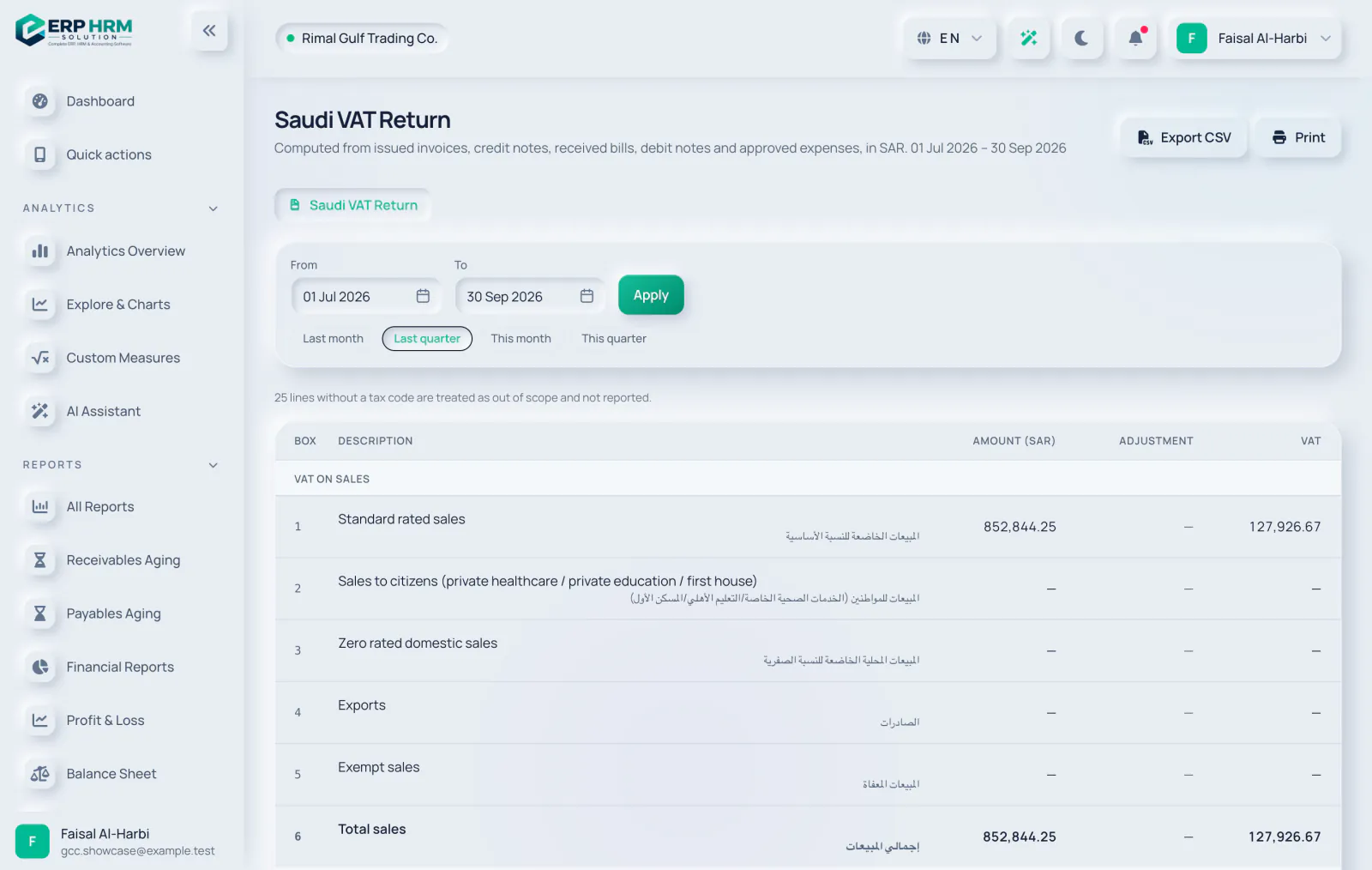
Saudi VAT return
- Sales: box 1 standard rated sales, 2 sales to citizens (private healthcare, private education, first house), 3 zero rated domestic sales, 4 exports and 5 exempt sales.
- Purchases: box 7 standard rated domestic purchases, 8 imports with VAT paid at customs, 9 imports under the reverse charge, 10 zero rated purchases and 11 exempt purchases.
- Reverse-charge VAT on imports (box 9) is both due and recoverable in the same return.
- Box 14 (corrections from previous periods) and box 15 (VAT credit carried forward) are entered when you file.
UAE VAT 201
- Standard-rated sales go to the box of your emirate (1a Abu Dhabi to 1g Fujairah). If no emirate is set, they show in a box marked “emirate not set” and the page asks you to set it in VAT settings.
- Box 3 supplies under the reverse charge, 4 zero rated supplies, 5 exempt supplies and 6 goods imported into the UAE.
- Box 9 standard rated expenses and box 10 reverse-charge supplies (a reverse-charge purchase feeds both box 3 and box 10).
- Box 2 (tourist refunds) and box 7 (import adjustments) are entered when you file.
Bahrain VAT return (NBR)
- Sales: box 1 standard rated sales (10%), 2 sales to registered taxpayers in other GCC States (not active, always zero), 3 sales under the domestic reverse charge, 4 zero rated domestic sales, 5 exports and 6 exempt sales.
- Purchases: box 8 standard rated domestic purchases, 9 imports with VAT paid at customs or deferred, 10 imports under the reverse charge, 11 purchases under the domestic reverse charge and 12 purchases from non-registered suppliers, zero rated or exempt.
- Reverse-charge VAT (boxes 10 and 11) is both due and recoverable in the same return. Domestic reverse-charge sales (box 3) carry no VAT, because the buyer accounts for it.
- Box 15 (corrections from previous periods, between -5,000 and 5,000 BHD) and box 16 (VAT credit carried forward) are entered when you file. Box 17 is the net VAT due or reclaimed.
- Amounts are shown to 3 decimals. The box titles follow the NBR portal form as published by secondary sources, so the page asks you to check them on the NBR portal.
Oman VAT return (OTA)
- Section 1, supplies in Oman: 1a taxed at 5%, 1b taxed at 0%, 1c exempt, and 1f the profit margin scheme (entered when you file). 1d and 1e are not active until GCC rules apply.
- Section 2: 2b purchases from outside the GCC under the reverse charge (2a is not active). Section 3: 3a exports. Section 4: 4a imports with VAT postponed and 4b all other imported goods.
- Section 5: 5a total VAT due (1a + 1f + 2a + 2b + 4a) and 5b adjustments, which already include your credit notes. Add other adjustments, such as bad debts, when you file.
- Section 6, input VAT: 6a purchases except imported goods, 6b imported goods, 6c fixed assets and 6d adjustments, which already include your debit notes.
- Section 7: 7a total VAT due, 7b total input VAT (shown as a negative figure) and 7c the net VAT payable or refundable.
- Boxes show VAT before adjustments, as the OTA guide asks. Amounts are shown to 3 decimals.
Related guides
Ask about the product
Ask what the software can do, how a task works, or which countries and languages it supports. Answers come from these guides.
Thinking…
The AI assistant is not available right now. Search the guides or talk to our team. Contact support
AI can make mistakes. Check the linked guides.
Still need help?
Our support team reads every message and answers in plain language.
Contact support