You can change your plan or switch between monthly and yearly billing at any time.
-
Step 1: Open the plans
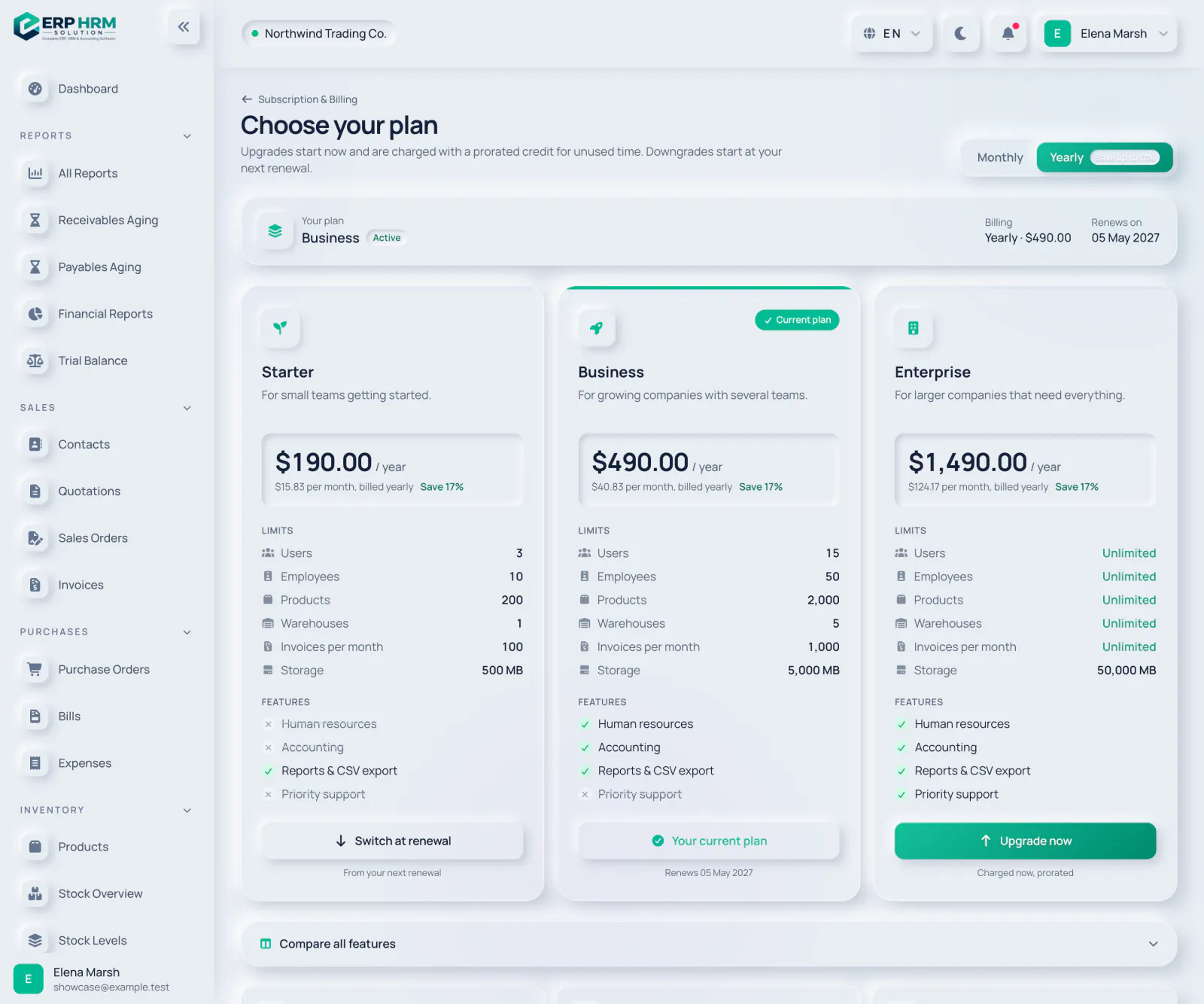
In Subscription & Billing, select Change plan or Compare plans. The page is titled Choose your plan.
-
Step 2: Choose monthly or yearly
Use the Monthly and Yearly switch. Yearly prices show how much you save.
- 1. Monthly or yearly
- 2. Your current plan
- 3. Current plan badge
-
Step 3: Check the currency
Prices are shown in your company currency when the plan has a price in it (for example Indian rupees for companies in India), otherwise in US dollars. Prices include any applicable tax (VAT or GST), so the price shown is the amount you pay.
-
Step 4: Pick the plan
Each plan lists its limits and features; open Compare all features for a side-by-side table. The button on each plan tells you what will happen, for example Upgrade now or Switch at renewal.
- 1. Downgrade: Switch at renewal
- 2. Upgrade: Upgrade now
-
Step 5: Confirm
A confirmation explains the change, the charge and the date before anything happens. Confirm to apply it.
What happens next
- Upgrade now — a Plan upgrade invoice is issued at once, minus a credit for the unused, already paid part of your current plan. Your current plan stays active until the invoice is paid; then the new plan and its limits start with a new period from that day.
- Switch at renewal — for a cheaper plan. You keep your current plan and limits until your next renewal, then the new plan starts. Nothing is refunded.
- Switch trial to this plan — during a trial the plan changes straight away, with no charge until the trial ends.
- Choose plan — when you have no subscription yet, the first invoice is issued now.
Related guides
Ask about the product
Ask what the software can do, how a task works, or which countries and languages it supports. Answers come from these guides.
Thinking…
The AI assistant is not available right now. Search the guides or talk to our team. Contact support
AI can make mistakes. Check the linked guides.
Still need help?
Our support team reads every message and answers in plain language.
Contact support