Skip to content

One Platform. Complete Business Control.

Run sales, purchasing, inventory, accounting, VAT and e-invoicing, HR and payroll, point of sale, CRM and projects in one integrated platform built for the GCC.

  • Easy to UseUser Friendly
  • Secure & ReliableEnterprise Security
  • Cloud-basedNothing to install
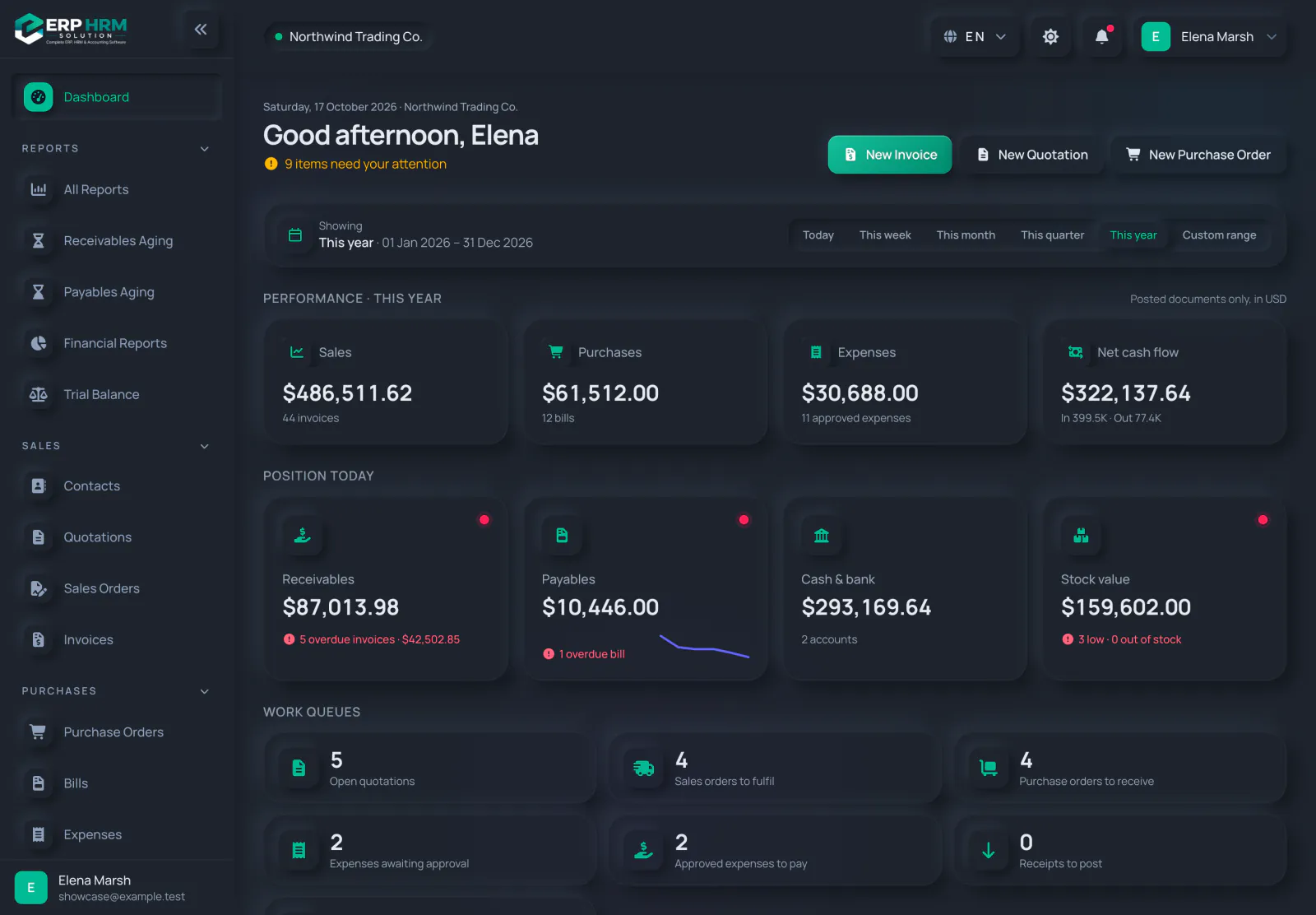
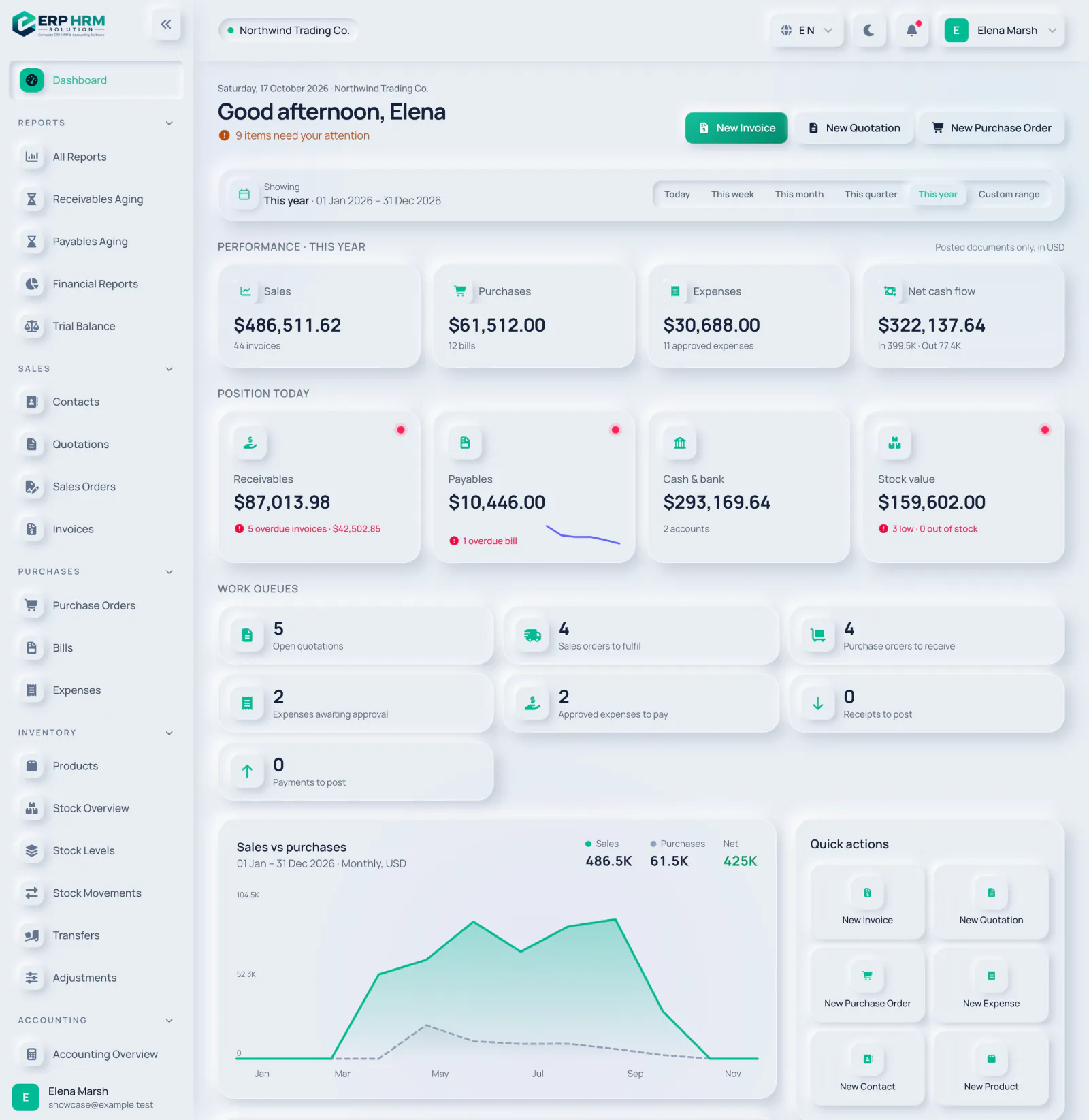
Business dashboard with yearly sales, purchases, expenses and cash flow, receivables and payables, work queues and a sales vs purchases chart

Every part of your business, in one connected workspace

Switch between modules to see the real screens your team will use every day.

Dashboard

A live overview of the business that respects each person's role: everyone sees the figures they are allowed to see.

  • Period filtersToday, this week, month, quarter, year or any custom range — every figure follows.
  • Cash and positionReceivables, payables, cash and bank balances and stock value in one place.
  • Charts that matterSales versus purchases, receivables and payables by age, and expenses by category.
  • Work queuesQuotations to follow up, orders to fulfil, bills to pay and expenses to approve.
Explore Dashboard
Business dashboard with yearly sales, purchases, expenses and cash flow, receivables and payables, work queues and a sales vs purchases chart

Sales & invoicing

From the first quote to the final payment, every sales document flows into the next — and into your books.

  • Quote to cashConvert quotations to sales orders and invoices without retyping anything.
  • Payments and balancesRecord full or partial payments; balances and statuses update automatically.
  • Receivables ageingKnow exactly who owes what, and for how long, at any date.
  • Professional documentsPrint-ready invoices with your branding, taxes and QR codes.
Explore Sales & invoicing
Invoice list with status tabs, filters, amounts, balances due and paid, issued, overdue and draft badges

Point of sale

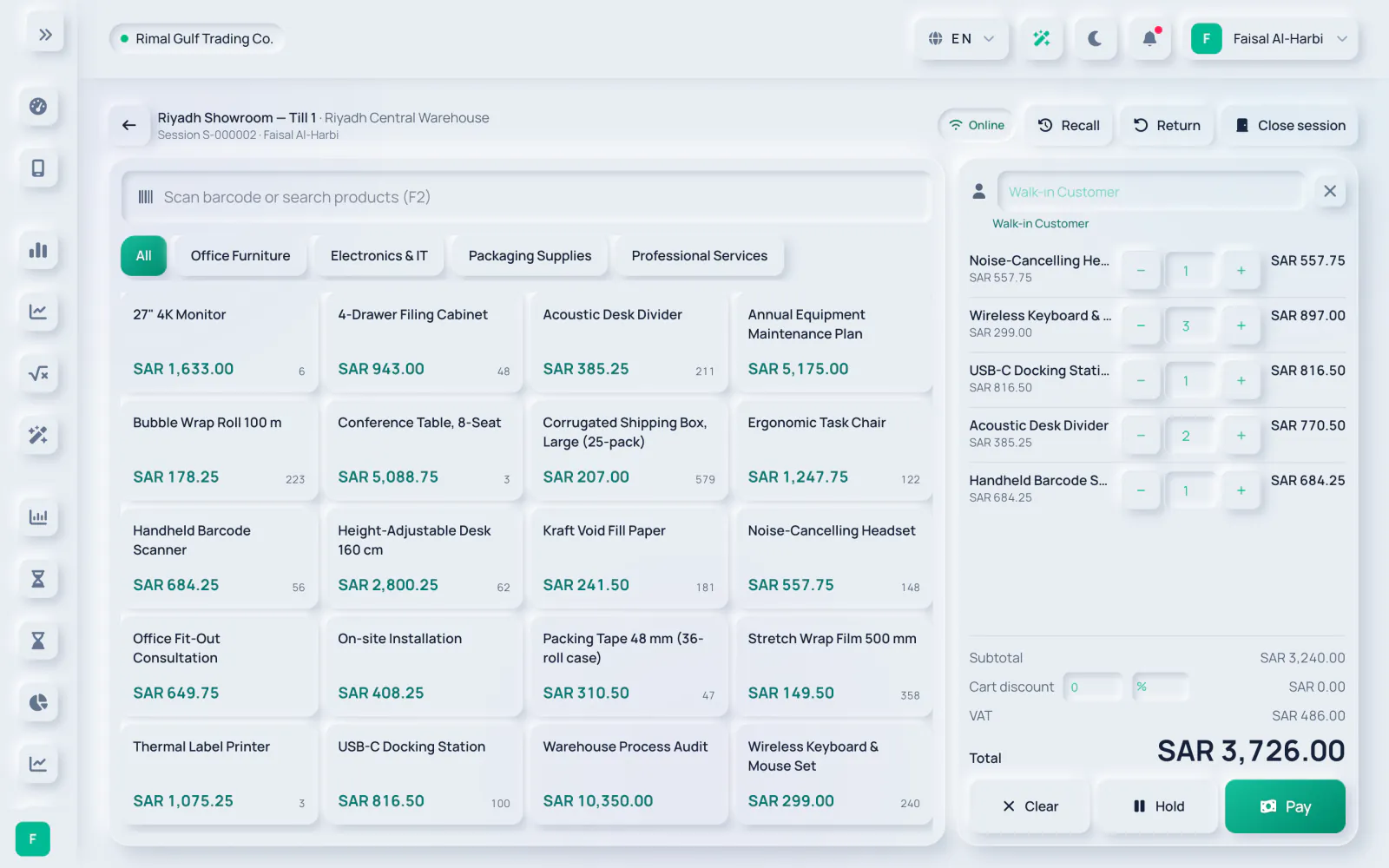
Sell at the counter with a till that creates real invoices, moves stock and posts to your books — and keeps selling when the connection drops, with each offline sale invoiced when it syncs.

  • Sessions and registersOpen a session on a register with an opening float; each register has one open session at a time.
  • Fast checkoutSell from the catalogue, hold and recall sales, and take cash, card or other tenders.
  • Every sale is an invoiceVAT and e-invoicing apply to till sales, and stock and cost of sales post automatically.
  • Close with a Z reportCount the cash, post any over or short amount and freeze the Z report. Returns are refunded with a credit note.
Explore Point of sale
Point-of-sale till with a product grid by category, five items in the cart, VAT and the total ready to pay

Inventory & stock

Always know what you have, where it is and what it is worth.

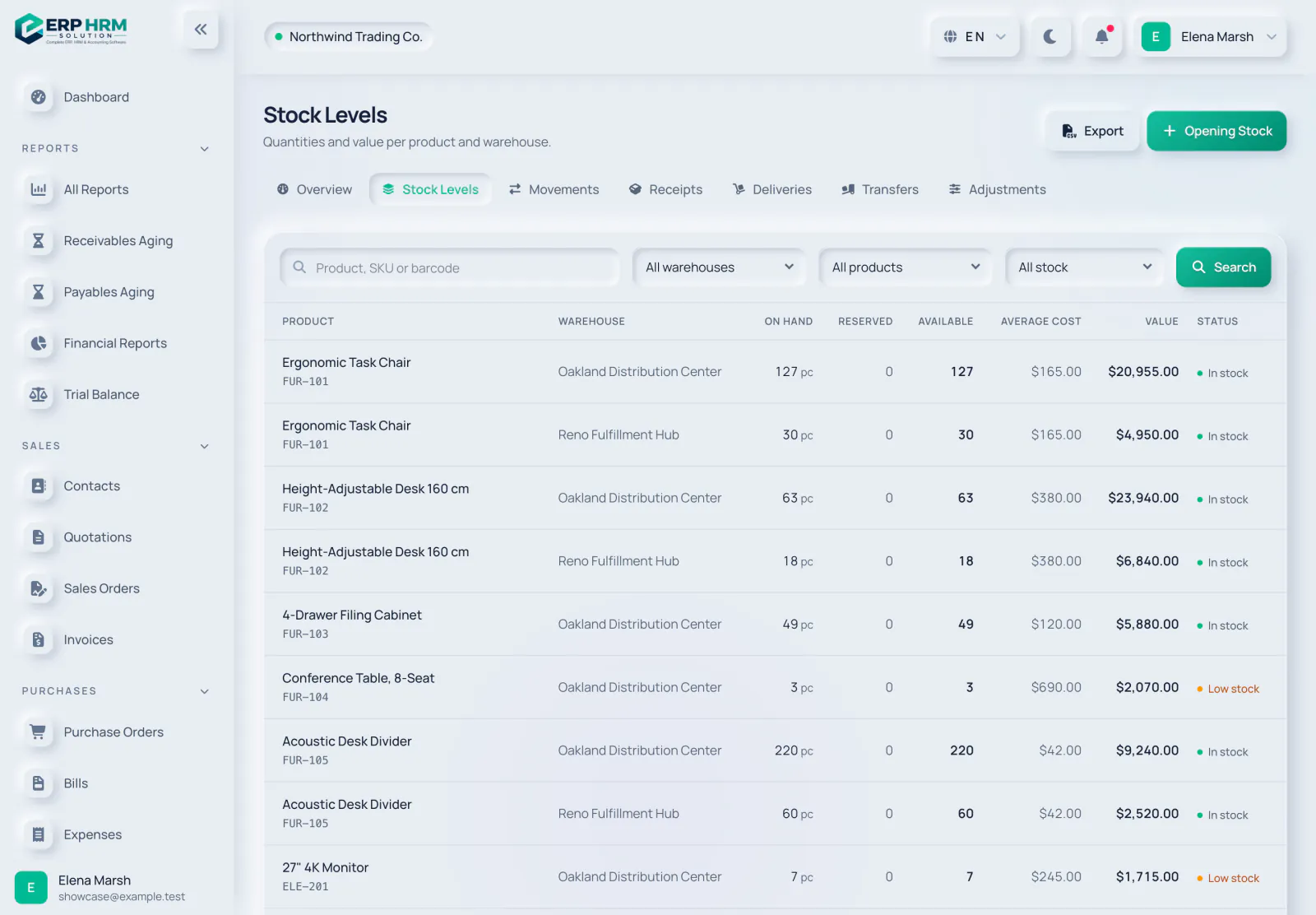
  • Multiple warehousesTrack quantities on hand, reserved and available per location.
  • Every movement recordedReceipts, issues, transfers and adjustments in one ledger.
  • Stock alertsLow and out-of-stock warnings before they become lost sales.
  • ValuationStock value at weighted average cost per warehouse, by product, warehouse or category.
Explore Inventory & stock
Stock levels per product and warehouse with quantities, average cost, value and stock status

Accounting

Invoices, bills, payments and expenses post to a real double-entry ledger, so your reports are always up to date.

  • Chart of accountsA ready-made chart you can extend, with account mapping per company.
  • Automatic postingsSales, purchases, payments and expenses create balanced journal entries.
  • Financial statementsProfit & loss, balance sheet, cash flow, trial balance and general ledger, with comparison periods.
  • Recurring journals and dimensionsSchedule recurring entries and tag postings with cost centres.
Explore Accounting
Profit and loss and financial position for the year with totals by account type

Tax & e-invoicing

Built for GCC tax rules: returns built from your posted documents, e-invoices cleared or reported automatically, and worksheets that prepare your filings.

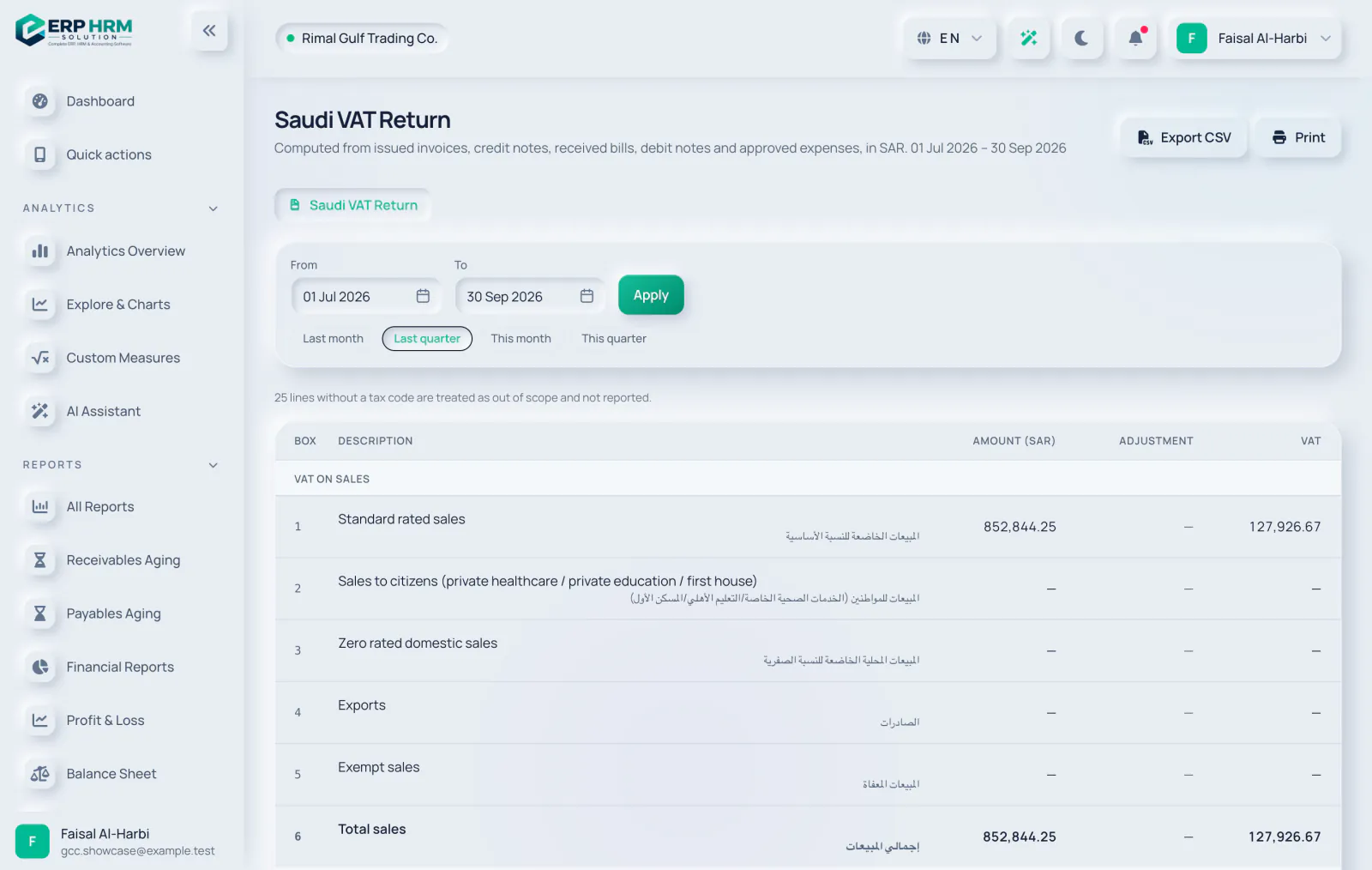
  • VAT returnsThe Saudi VAT return and the UAE VAT 201, built from posted documents with drill-down, filing snapshots and period locks.
  • ZATCA Phase 2Onboarding, clearance of standard invoices and reporting of simplified invoices, with the QR code, hash chain and signed XML handled for you.
  • UAE e-invoicingPINT-AE invoices through an accredited service provider whose API is compatible with our connector — ask us before you appoint one — and an inbox that turns supplier e-invoices into draft bills.
  • Tax worksheetsUAE Corporate Tax, KSA Zakat and KSA withholding tax worksheets that prepare your returns. Filing stays with you.
Explore Tax & e-invoicing
Saudi VAT return for a quarter with standard-rated, zero-rated, export and exempt sales boxes in English and Arabic, with amounts and VAT in SAR

People & HR

Everything about your team in one place, with self-service for employees and approvals for managers.

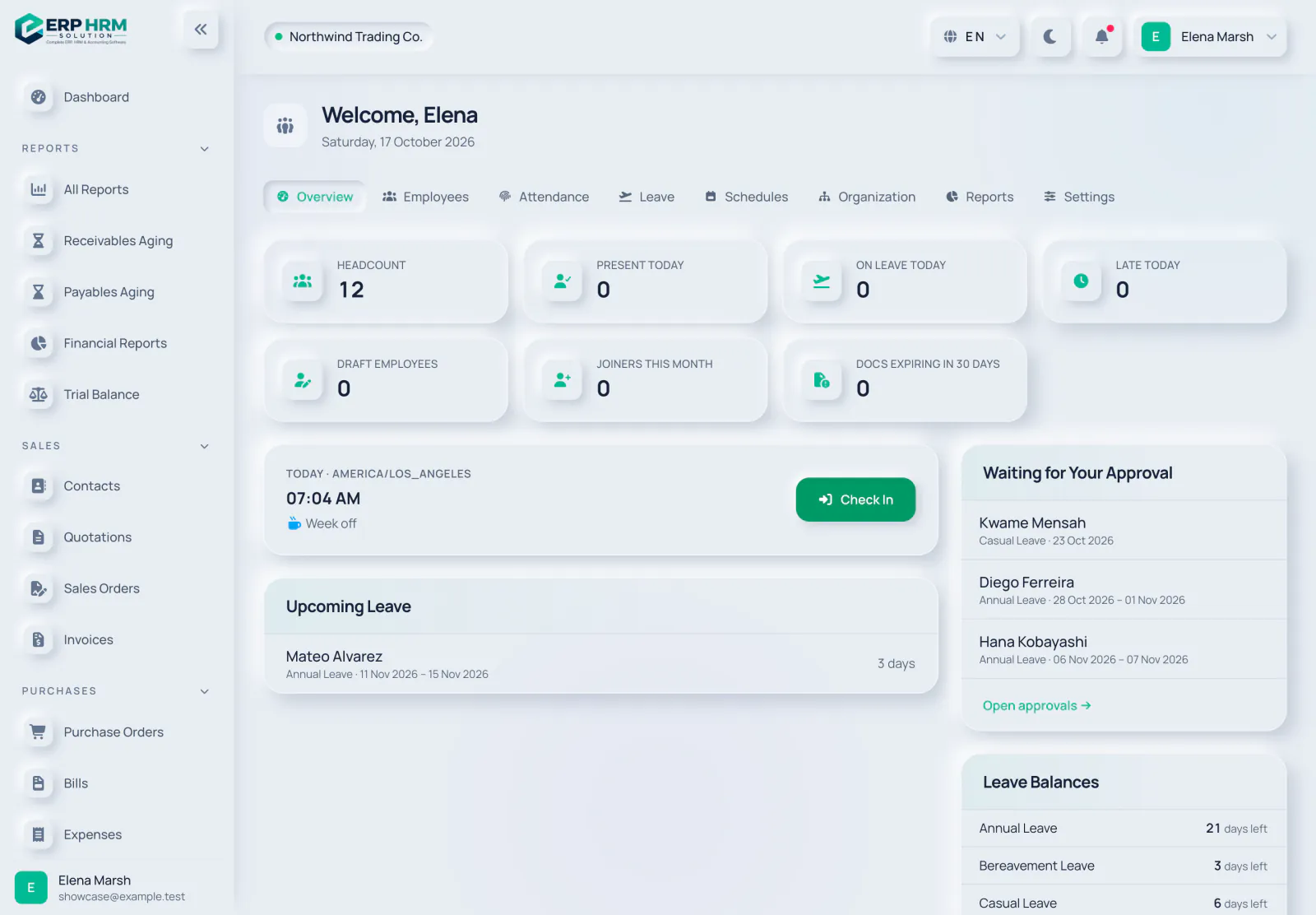
  • Employee recordsDepartments, designations, managers, contracts and documents with expiry reminders, including iqama and Emirates ID.
  • AttendanceCheck-in and check-out, schedules and shifts, corrections with approval.
  • Leave managementLeave types, balances, requests and approvals with a team calendar.
  • Growth and reportsOnboarding checklists, performance reviews, training and HR reports with CSV export.
Explore People & HR
HR overview with headcount, attendance today, leave, approvals and leave balances

Payroll & end of service

Run payroll for GCC teams from salary profiles to approved runs, salary transfer files and final settlements, with every run posted to your books.

  • Payroll runs and payslipsMonthly runs move from draft to approved to paid, with a payslip for every employee.
  • Salary transfer filesUAE WPS SIF, Saudi Mudad or bank files, and bank-transfer files for Oman, Qatar, Kuwait and Bahrain.
  • Social insuranceGOSI, GPSSA, SPF, SIO, PIFSS and GRSIA rates with effective dates that your company can edit.
  • End of service and final settlementGratuity follows each GCC country's rules. Cases the law leaves open are flagged for manual review, never guessed.
Explore Payroll & end of service
A paid monthly payroll run for 12 employees with totals for gross pay, deductions, employer contributions and net pay, the posted journal and end-of-service accrual, and a line per employee in SAR

CRM & pipeline

Capture leads, move deals through your pipeline and turn the ones you win into quotations — in the same system that invoices them.

  • LeadsCreate leads or import them from CSV with column mapping, then convert them.
  • Deal pipelineMove deals through stages, mark them won or lost, and create a quotation from a deal.
  • Activities and follow-upsTasks and reminders, round-robin lead assignment and automatic follow-up tasks for idle leads.
  • Web forms and emailPublic lead-capture forms, template emails through your own mail server and WhatsApp click-to-chat links.
Explore CRM & pipeline
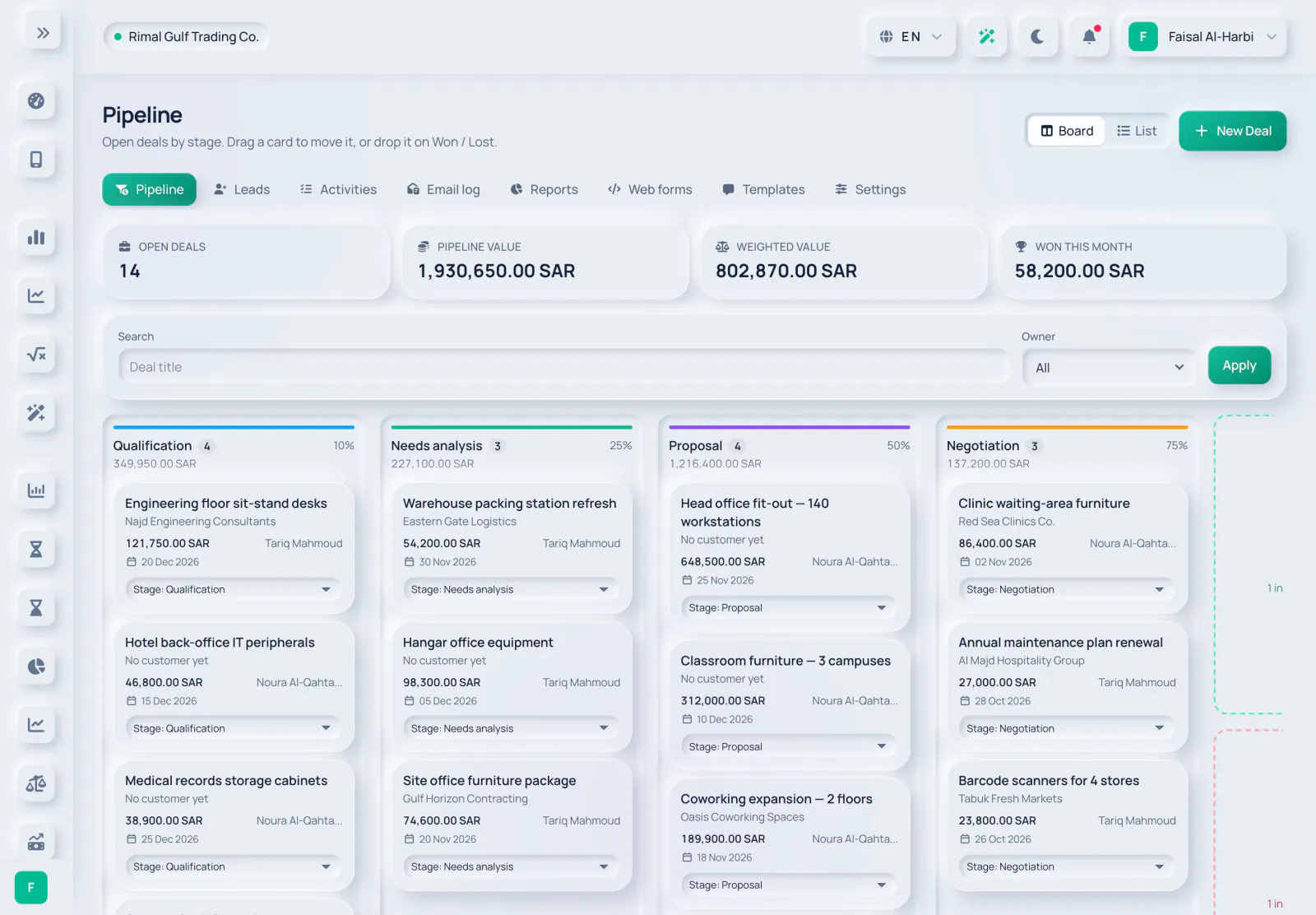
CRM deals board with open deals, pipeline value, weighted value and deals won this month, and deal cards in each stage

Projects & time

Plan the work, track the time and invoice it — then see what each project really earned.

  • Boards and timelinesKanban stages, a list view, a timeline and milestones, with comments and attachments on tasks.
  • TimesheetsLog, submit and approve time, with a My Tasks page for everyone.
  • Project billingCreate draft invoices from approved billable time and reached milestones.
  • ProfitabilityProfitability and project analytics, plus an R&D time report for flagged projects.
Explore Projects & time
Kanban board for a fit-out project with To do, In progress, Review and Done columns, task priorities, due dates, estimates and assignees

Reports & analytics

Answer business questions in a few clicks, explore the numbers behind them, then export the data for anyone who needs it.

  • Across every moduleSales and customer reports, purchases, tax, bank and cash, stock, expenses and HR.
  • Analytics explorerSlice your data with charts and drill-down, add custom measures and save or pin your views.
  • Safe CSV exportExports follow the same filters and permissions as the screen.
  • Print-friendlyClean printed reports for meetings and audits.
Explore Reports & analytics
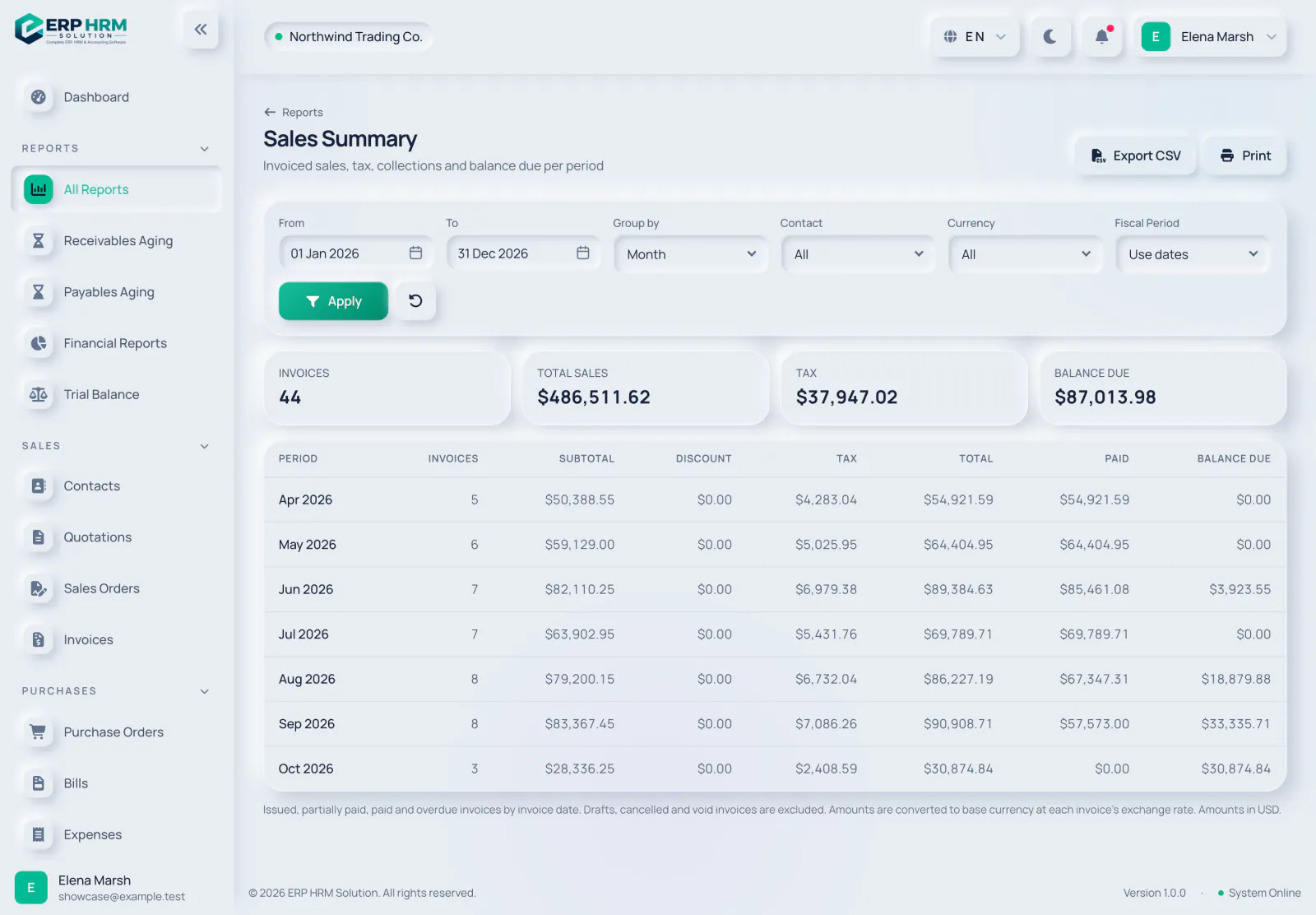
Monthly sales summary with invoice counts, tax, totals, collections and balance due

AI assistant

An assistant that answers questions about your own figures and about how to use the software, reading only what your role is allowed to see.

  • Ask your dataQuestions about sales, receivables, spending and more, answered from your company's records within your permissions.
  • How-to help on every pageOpen the help button on any page for what the page does, suggested questions and the matching guides.
  • Bill and receipt captureUpload a photo or PDF of a bill or receipt (up to 10 MB) and get a draft to check and save.
  • Private by designPersonal details in the records the assistant reads (emails, phones, IBANs, ID and card numbers) are masked before they are sent to the AI provider — what you type in chat and uploaded receipts are sent as entered. An admin can switch AI off, and each plan has a monthly AI allowance.
Explore AI assistant
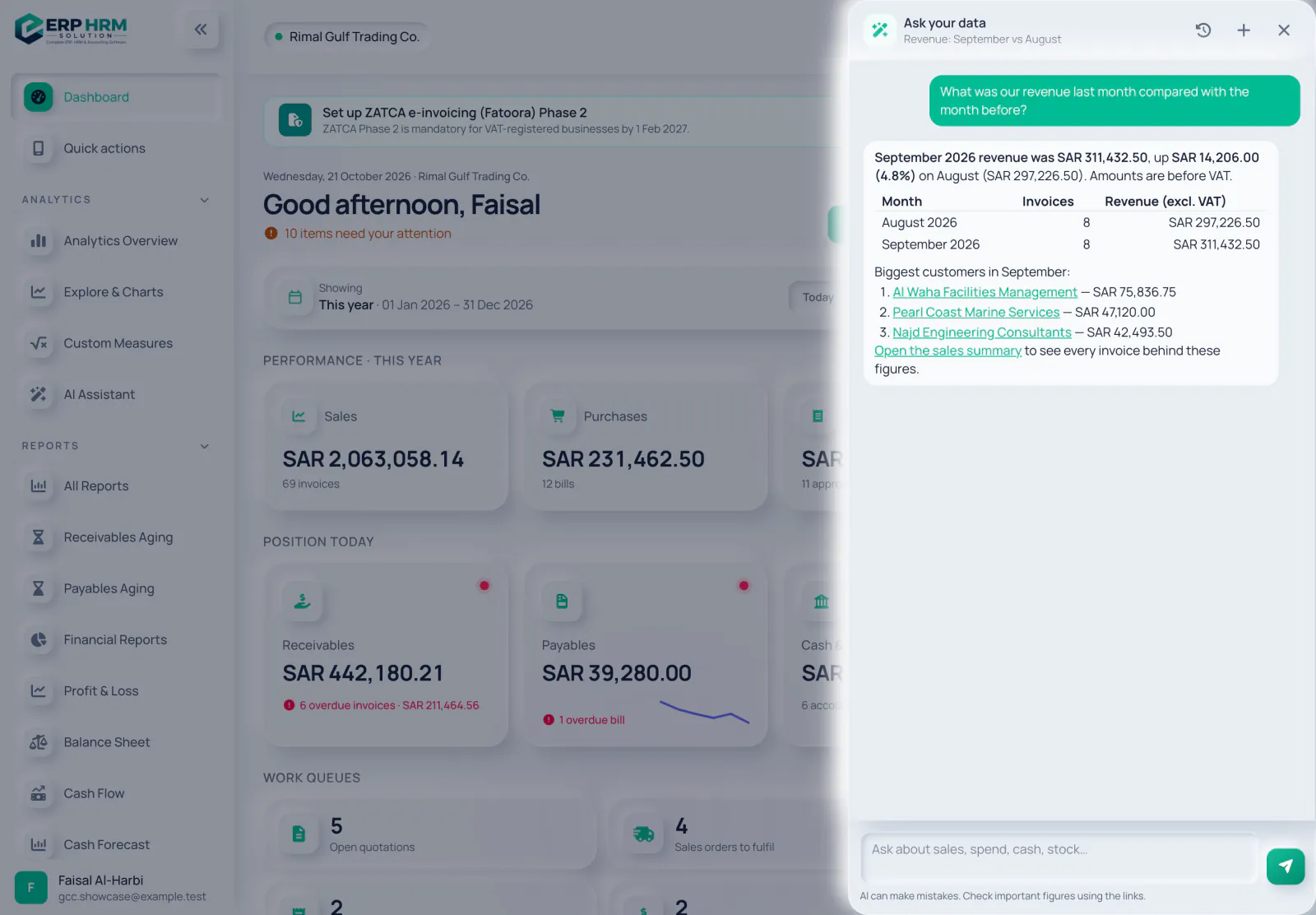
The AI assistant answering a question about last month's revenue compared with the month before, with a table and links to the customers and the sales report

Clear numbers. Clean documents.

Every figure on the dashboard comes from your posted documents, and every document shows exactly where it stands.

Monthly sales and purchases chart with totals for sales, purchases and net
Sales vs purchases — for any period, in your base currency.
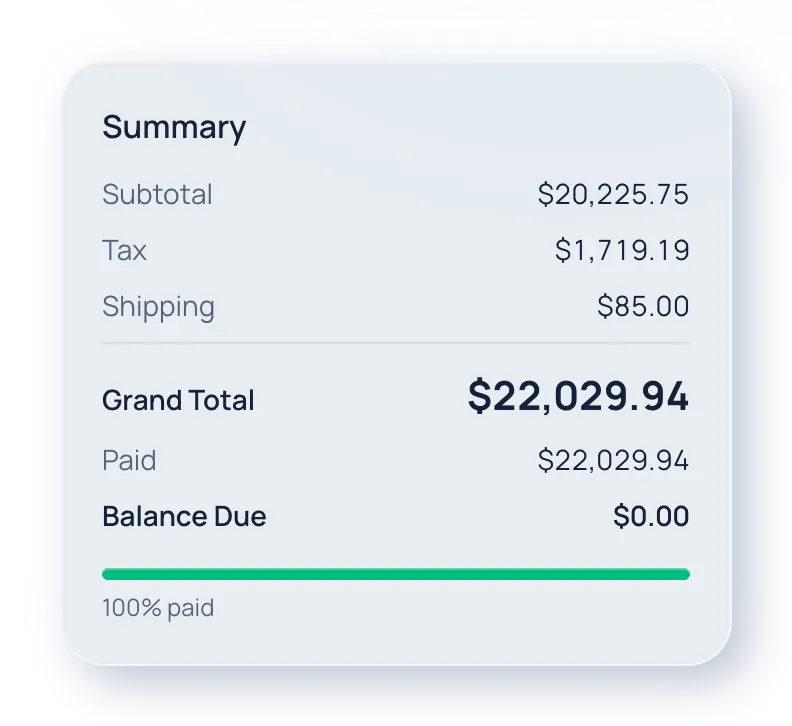
Invoice subtotal, tax, shipping, grand total and payment progress
Invoice totals — tax, shipping and payments at a glance.
Sales, purchases, expenses and net cash flow for the selected period
Performance — sales, purchases, expenses and net cash flow, compared with the previous period.
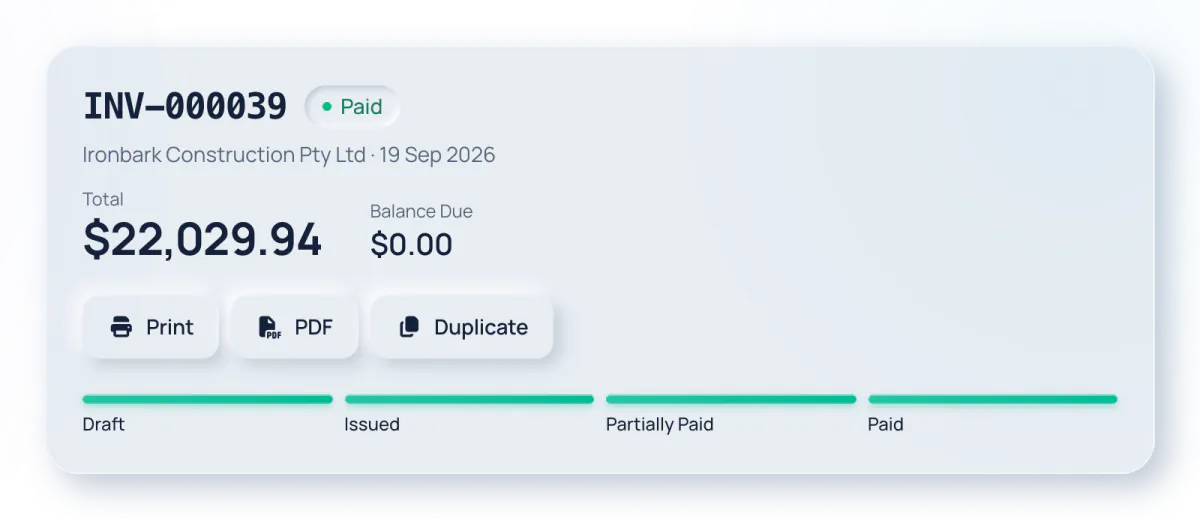
A paid invoice with its total, balance due and status progress from draft to paid
Document status — from draft to paid, with print and duplicate one click away.
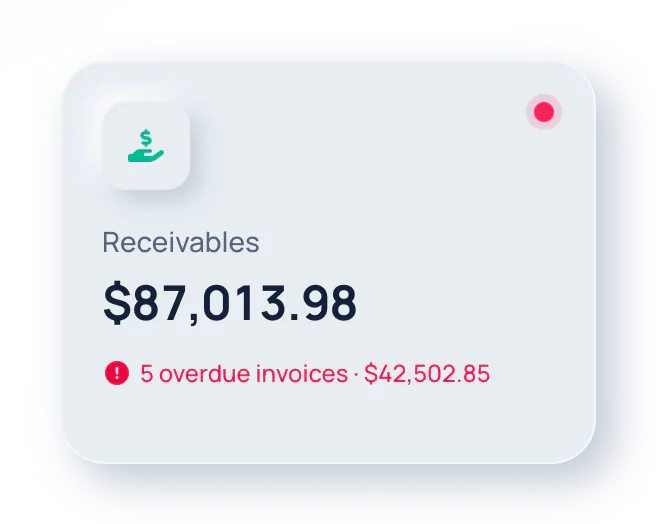
Receivables total with overdue invoices highlighted
Receivables — overdue invoices flagged automatically.

Enter it once. Everything else follows.

Documents move from one step to the next, stock moves with them, and every amount lands in your books — no re-typing, no spreadsheets to reconcile.

Quotation

Send a professional quote

Sales order

Confirm the order and deliver

Delivery

Issue goods from the warehouse

Invoice

Bill the customer, record payment

Accounts

Journal entries post automatically

Everything a growing company needs

18 modules that work together out of the box, with permissions for every role.

Dashboard

See sales, purchases, cash, receivables and stock at a glance, for any period.

Sales & invoicing

Quotations, sales orders and invoices with payments, ageing and printable documents.

CRM & pipeline

Leads, a deal pipeline, activities and web forms, with won deals turned into quotations.

Point of sale

A till for counter sales with sessions, held sales, returns, Z reports and an offline mode.

Purchasing & vendors

Purchase orders, goods receipts and vendor bills with payables ageing.

Inventory & stock

Multi-warehouse stock, movements, transfers, adjustments and low-stock alerts.

Projects & time

Kanban boards, milestones, timesheets and invoices from approved billable time.

Accounting

Double-entry ledger, journals, trial balance, profit & loss, balance sheet and cash flow.

Banking & reconciliation

Statement import as CSV, OFX/QFX, MT940 or CAMT.053, bank rules and reconciliation to a zero difference.

Tax & e-invoicing

Four GCC VAT return forms, ZATCA Phase 2 e-invoicing live, UAE PINT-AE ready ahead of the 2027 mandate, an Oman Fawtara preview, and Corporate Tax, Zakat and WHT worksheets.

Planning & close

Budgets with spending control, period and year-end close, FX revaluation and fixed assets with straight-line or declining-balance depreciation.

Expense management

Submit, approve and pay expenses with receipts and categories.

People & HR

Employees, attendance, shifts and leave, with expiry reminders on documents such as iqama and Emirates ID.

Payroll & end of service

Payroll runs and payslips with salary files for all six GCC countries from one approval, social insurance and end-of-service settlements.

Reports & analytics

Reports for every module, an analytics explorer with drill-down and CSV export.

AI assistant

Ask questions about your data, get how-to help on every page and capture bills and receipts.

Integrations & mobile

A REST API with webhooks, online invoice payments and an installable mobile web app.

Users, roles & security

Role-based access, activity history and company data kept separate.

AI assistant built in

Ask your business a question. Get an answer from your own data.

An assistant that answers questions about your own figures and about how to use the software, reading only what your role is allowed to see.

  • Ask your dataQuestions about sales, receivables, spending and more, answered from your company's records within your permissions.
  • How-to help on every pageOpen the help button on any page for what the page does, suggested questions and the matching guides.
  • Bill and receipt captureUpload a photo or PDF of a bill or receipt (up to 10 MB) and get a draft to check and save.
  • Private by designPersonal details in the records the assistant reads (emails, phones, IBANs, ID and card numbers) are masked before they are sent to the AI provider — what you type in chat and uploaded receipts are sent as entered. An admin can switch AI off, and each plan has a monthly AI allowance.
Explore AI assistant
The AI assistant answering a question about last month's revenue compared with the month before, with a table and links to the customers and the sales report

Compliance deadlines we track

The e-invoicing mandates coming up across the GCC, with the dates that decide when your business must be ready.

1 Feb 2027

ZATCA Wave 25 — Saudi Arabia

Businesses with VAT-relevant revenue above SAR 187,500 in any year from 2022 to 2025 must integrate with Fatoora by 1 February 2027 (announced 24 July 2026).

ZATCA e-invoicing software
1 Jan 2027

UAE e-invoicing goes live

Businesses with revenue of AED 50 million or more issue PINT-AE e-invoices through an accredited service provider from 1 January 2027; everyone else follows from 1 July 2027 (Ministerial Decisions 243 and 244 of 2025).

UAE e-invoicing software
1 Apr 2027

Oman Fawtara begins

E-invoicing becomes mandatory on 1 April 2027 for businesses with annual supplies above OMR 5 million, and on 1 October 2027 for the rest (OTA Decision 189/2026). Our software gives a PINT OM preview today — it does not send to Fawtara yet.

ERP for Oman

Last verified: 2026-10-27 · Sources: ZATCA, UAE Ministry of Finance, Oman Tax Authority

Free GCC payroll and tax calculators

End-of-service gratuity for all six GCC countries and VAT at each country's rate — sourced, dated and free to use.

Your language. Your currency. Your way of working.

Work in 18 languages — with proper right-to-left layouts — and issue documents in your customers' currencies.

18 languages, right-to-left ready
Choose from 18 interface languages, including full right-to-left layouts for Arabic and Persian.
Multi-currency documents
Invoices, bills and payments in your customers' and suppliers' currencies, reported in yours, with FX revaluation.
Ready for GCC compliance
VAT rates, salary files, social insurance and end-of-service rules for Saudi Arabia, the UAE, Oman, Bahrain, Qatar and Kuwait, plus ZATCA and UAE e-invoicing.
Any device, light or dark
Responsive screens for desktop, tablet and phone, an installable mobile web app and a dark mode.
The business dashboard in Arabic with a right-to-left layout

18 languages, right-to-left ready

Choose from 18 interface languages, including full right-to-left layouts for Arabic and Persian.

Up and running on day one

Your workspace comes ready with accounting, taxes and master data, so you can start with real work instead of setup.

  1. 1

    Create your account

    Sign up and your company workspace is ready in minutes, with a chart of accounts, VAT rates for your country and master data set up for you.

  2. 2

    Set up your company

    Add your logo, currency, tax details and document numbering, and connect e-invoicing where your country needs it.

  3. 3

    Invite your team

    Add users and give each a role — accountant, sales, inventory, HR and more.

  4. 4

    Add your data

    Customers, vendors, products, employees and opening stock, then start selling, buying and running payroll.

  5. 5

    Track and grow

    Use the dashboard, reports, analytics and the AI assistant to see how the business is doing.

Simple plans that grow with you

Every plan includes the core platform. Pick the limits that fit your team today and upgrade whenever you need more.

Starter

For small teams getting started.

$10.00/ month

$99.00/ year

Billed monthly $8.25 per month, billed yearly · Save 18%

Get Started

14-day free trial · choose your plan any time

  • Users 3
  • Employees 10
  • Products 200
  • Warehouses 1
  • Invoices per month 100
  • Storage 500 MB
  • AI requests per month 100
  • AI tokens per month 1,000,000
Most popular

Business

For growing companies with several teams.

$35.00/ month

$348.00/ year

Billed monthly $29.00 per month, billed yearly · Save 17%

Get Started

14-day free trial · choose your plan any time

  • Users 15
  • Employees 50
  • Products 2,000
  • Warehouses 5
  • Invoices per month 1,000
  • Storage 5,000 MB
  • AI requests per month 1,000
  • AI tokens per month 10,000,000

Enterprise

For larger companies that need everything.

$99.00/ month

$986.00/ year

Billed monthly $82.17 per month, billed yearly · Save 17%

Get Started

14-day free trial · choose your plan any time

  • Users Unlimited
  • Employees Unlimited
  • Products Unlimited
  • Warehouses Unlimited
  • Invoices per month Unlimited
  • Storage 50,000 MB
  • AI requests per month 5,000
  • AI tokens per month 50,000,000

Prices in USD. Applicable taxes are added on the invoice. Upgrade any time; downgrades apply at renewal.

Your data is yours — and only yours

The platform is built for many companies at once, so separating and protecting each company's data is part of its foundation.

Company data kept separate

Every record belongs to one company and every query is scoped to it. One customer can never see another's data.

Role-based permissions

Permissions are checked on the server for every page and action, not just hidden in the interface.

Activity history

Sign-ins and important changes are recorded so you can see who did what.

Protected secrets

Sensitive settings such as mail and payment-gateway keys are stored encrypted and never shown back.

Secure sessions

Idle timeouts, sign-out of other devices and protection against common web attacks.

No card data stored

Online payments run on the payment provider's secure page; card details never reach our servers.

Questions, answered

It brings sales, CRM, point of sale, purchasing, inventory, projects, accounting, banking, VAT and e-invoicing, expenses, HR, payroll and reporting into one workspace for your company. Documents flow from one step to the next — a quotation becomes an order and an invoice, and every invoice, bill, payment, expense and payroll run posts to your books automatically.

The six GCC countries: Saudi Arabia, the UAE, Qatar, Kuwait, Bahrain and Oman. Each gets its VAT rates where VAT applies, a salary transfer file such as the UAE WPS SIF or a Mudad file, social insurance rates and the statutory end-of-service rule. Companies elsewhere can use the core ERP with their own tax rates. Always confirm legal positions with your adviser.

Where a mandate is live, yes. In Saudi Arabia it runs ZATCA Phase 2: standard invoices are cleared before issue and simplified invoices reported within 24 hours, with the QR code and signed XML handled for you. For the UAE it creates and validates PINT-AE invoices and sends them through an accredited service provider whose API is compatible with our connector — ask us before you appoint one. Oman's Fawtara is not live in the software yet — it gives a PINT OM preview only.

Yes. Arabic uses a full right-to-left layout on every screen, report and printed document, and each person picks their own interface language from the 18 available — so your accountant can work in Arabic while a colleague works in English.

Yes. It answers questions about your company's data and about how to use the software, and turns photos or PDFs of bills and receipts into drafts. It only reads what your role is allowed to see, personal details in the records it reads (emails, phones, IBANs, ID and card numbers) are masked before they are sent to the AI provider — chat text and uploaded receipts are sent as entered — and each plan includes a monthly AI allowance.

Your workspace is created as soon as you sign up, with a chart of accounts, taxes, units, a warehouse and other master data ready to use. Most teams add their company details, invite users and start creating documents on the first day.

Yes. New companies start with a 14-day free trial. You can choose or change your plan at any time from Subscription & Billing.
Still have questions? Talk to our team

One Platform. Complete Business Control.

Powering People & Business. Run sales, point of sale, inventory, accounting, VAT, HR and payroll from one place today.

Chat with AI