Language is personal: every user picks their own interface language in the top bar or in My Profile. Company-wide defaults live in Settings → Localization and Settings → Financial.
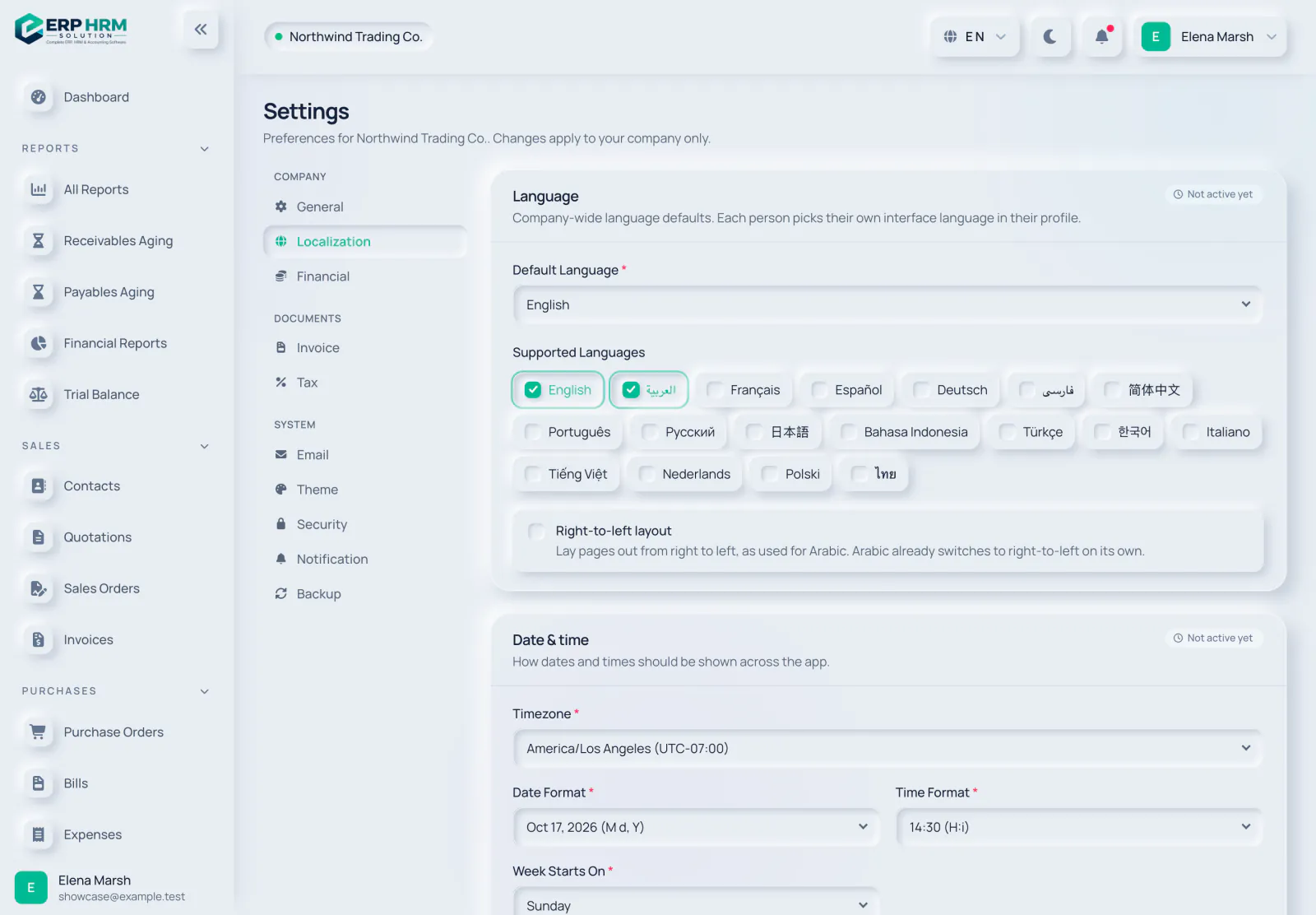
- 1. Localization settings
- 2. Default Language
- 3. Supported Languages
- 4. Not active yet badge
What the Localization page holds
- Language — Default Language, Supported Languages and a Right-to-left layout option.
- Date & time — Timezone, Date Format, Time Format and the day the week starts on.
Currency and number display
Settings → Financial shows your base currency and links to Master Data → Currencies, where exchange rates are kept. The Currency display options there (symbol, position, decimal places and thousands separator) are also Not active yet. Today, amounts are written in the style of the viewer’s language, in the document’s own currency.
Related guides
Ask about the product
Ask what the software can do, how a task works, or which countries and languages it supports. Answers come from these guides.
Thinking…
The AI assistant is not available right now. Search the guides or talk to our team. Contact support
AI can make mistakes. Check the linked guides.
Still need help?
Our support team reads every message and answers in plain language.
Contact support